The Factory Method is a creational design pattern, in which an interface handles the creation of objects without specifying the class of an object that will be created. The subclasses will declare the type of object to be created.
UML Diagram Example
The Product interface is implemented by ProductA and ProductB.
The Creator class holds a createProduct() factory method that returns new product objects. The return type of the factory method must match the target interface, in this case is product.
The Concrete Creators are sub classes of Creator and override the factory method, in order to return different type of product.
The factory method doesn’t have to create new instances all the time. It can be use for returning existing objects.
The observer pattern is a behavioral design pattern that allows an object (the observer) to notify other subscribed objects about any events that has occurred on the object they’re observing.
When should I use this?
When the change of a state in one object must be reflected in another object without keeping the objects tightly dependent on one another.
The Strategy design pattern is a behavioral pattern, where it defines a family of functionality, encapsulating each of them and making them interchangeable.
This strategy pattern can be useful in a road navigator software, where you have an interface called routeStrategy and it has an abstract buildRoute() function. An all the possible route strategies like RoadStrategy,PubTransportStrategy and WalkingStrategy classes will implement route strategy and override the buildRoute().
This will allow the navigator object to choose between strategies during runtime by calling the buildRoute().
In SQL there are 3 commands that are used to remove data from a database. Although they remove data, they have major differences.
Let’s assume we have a database call school and with in that school we have table call class, within this class we have a bunch of records of students that attend this class.
Drop command
drop table class;
The drop command will delete the whole table class, it will delete all of the records and the table structure from the database.
Delete command
#assuming student_id is a field of class
Delete from class
where student_id = 5;
The delete command is used to delete specific records from a table. In our example above it will only delete the record where student_id is 5.
Truncate command
Truncate table class;
The truncate command removes all the records of a table, with out dropping the table structure.
Lets say we want our java program to run multiple tasks concurrently, how will we accomplish this ? Well, the answer is “threads“, threads run concurrently with other threads.
class ThreadEx extends Thread

class ThreadEx implements Runnable
In order to create threads we have to extend the “Thread” class or implement “Runnable” interface. Well what’s the difference? Remember that in java we can’t extend from a class more than once, so we wouldn’t be able to have two classes extending from “Thread”. We can accomplish this by implementing the runnable class, allowing other classes to create threads.
//Not Possible
class ThreadEx1 extends Thread{
}

class ThreadEx2 extends Thread{
}

//Allowed
class ThreadEx1 implements Runnable{

}

class ThreadEx2 implements Runnable{

}
Next, thing we need to do is override the run() method from the thread class. The run() method run’s everything as a thread.
The Structure Query Language is the standard language for relational data bases. SQL uses tables to allow for setting or retrieving data from a database.
Q2: Define DDL, DML and DCL
DDL (Data Definition Language) – It allows you to perform sql commands that define the database scheme. Some of these commands are create, alter, drop.
DML ( Data Manipulation Language) – The DML consist of commands that manipulate data in the database. It helps you to insert, update, delete and retrieve data from the database.
DCL ( Data Control Language) – It allows you to control access to the database. Example – Grant, Revoke access permissions.
Q3: What is a DBMS?
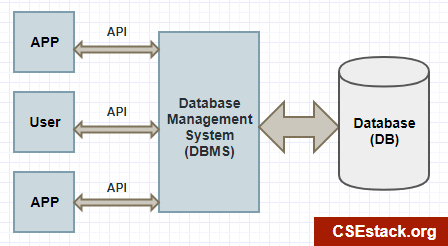
A Data Base Management System is a software that sits in between the user and database, allowing the user to interact with the database for manipulating and retrieving data. It ensures that our data is consistent, organized and is easily accessible.
Q4:What are the 2 types of DBMS?
RelationalDatabaseManagementSystem: The data is stored in relations, which are tables. MySQL
Non-Relational Database Management System: The data is not stored in relations/ tables. MongoDB
Q5: What are tables, fields and records?
Tables are a collection of data in the form of rows and columns. You first need to create the schema of the table before you can insert entries. Schema of the table is the skeleton of the table. Fields are the columns of the tables and records/ entries are the rows of the tables.
Q6: What are Constraints in SQL?
Constraints are rules given to fields when creating or altering a table.
NOT NULL – Restricts NULL value from being inserted into a column.
CHECK – Verifies that all values in a field satisfy a condition.
DEFAULT – Automatically assigns a default value if no value has been specified for the field.
UNIQUE – Ensures unique values to be inserted into the field.
INDEX – Indexes a field providing faster retrieval of records.
PRIMARY KEY – Uniquely identifies each record in a table.
FOREIGN KEY – Ensures referential integrity for a record in another table.
Q7: What is a Primary Key?
Primary Key is a field or a set of fields that uniquely represents a record in a table. It must contain unique values and has an implicit NOT NULL constraint. A table can only have oneprimarykey, comprised of a single field or multiple fields.
id int primary key

#multiple fields as a primary key
id int,
name varchar(50) not null,
constraint pk
primary key(id, name)
Q8: What is a Foreign Key?
A foreign key is a constraint on a field that refers to another primary key of another table.
film_id int foreign key (film_id)
 references  film(film_id)
Q9: What is the keyword for finding common records from two table?
We can use the INTERSECT command to find common records between two tables. MySQL doesn’t support this command use inner join instead.
select first_name from actor
INTERSECT
select first_name from customer;
In order to work with files in java we need to first learn about the file class. The file class allows us to represent a file in our file system. Let’s Import java.io.* for all the necessary classes.
import java.io.*;
File file =new File("dummy.txt");
File file2= new File("/Dev/java/dummy.txt");
In the code above we create two file objects representing dummy.txt, one in the current directory and the other in a specified directory. Instantiating the file class doesn’t create the file!
//creates the file
file.createNewFile();

//delete the file
file.delete();
We can use the createNewFile() method to create the file if it doesn’t exist. Similarly, we can delete the file with the delete() if it exist. Note that these functions will return an IO exception if an error occurs and should be handled.
//check if file is a directory
if(!file.isDirectory())
  System.out.println("Not a directory!")
String getFiles[]=file.list();
file object can also represent a directory, we can check if our file is a directory by calling isDirectory(), if true then we can get all the current files and directories with list(). List() method returns a string array.
Now that we know the basics of the file class, let’s learn how we can write to a file and read from one. In java, we have input and output streams that allows data to flow from a source and to a destination.
public static void writeFile() throws IOException{
 //Set the output stream in order to write to the file "Output data to the file"
  FileOutputStream out= new FileOutputStream("dummy.data");

//create a byte array
  byte b[]= new byte[]{10,20,30};

//write the array to file
  out.write(b);
  System.out.println("wrote to file");

  out.close();
}
To write to a file all we need to use is the FileOutputStream, which takes in a file. This opens up an output stream, we call the write() on the stream to write to the file. Close the stream when done using it. The FileOutputStream can only write bytes.
public static void readFile() throws IOException{
 //Set the input stream in order to read from file "Input data from the file"
  FileInputStream in= new FileInputStream("dummy.data");

 //create a byte array
  byte b[]= new byte[3];

 //read from the file
  in.read(b);

  for(byte x: b)
     System.out.print(x+" ");

  in.close();
}
Similarly, we can read from a file by using a FileInputStream. We call the read(bytes b[]) this method takes in byte array and stores the data on the array. The FileInputStream can only read bytes.
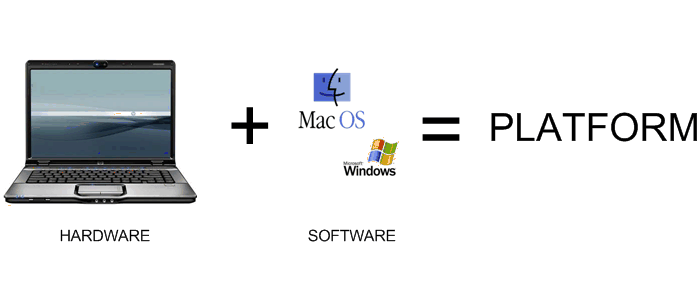
A:No, Java is a platform independent language. A platform independent language doesn’t depend on the operating system or hardware. Unlike programming languages like C++ or C which are platform dependent and won’t run on every platform.
Q2: What makes Java a platform independent language?
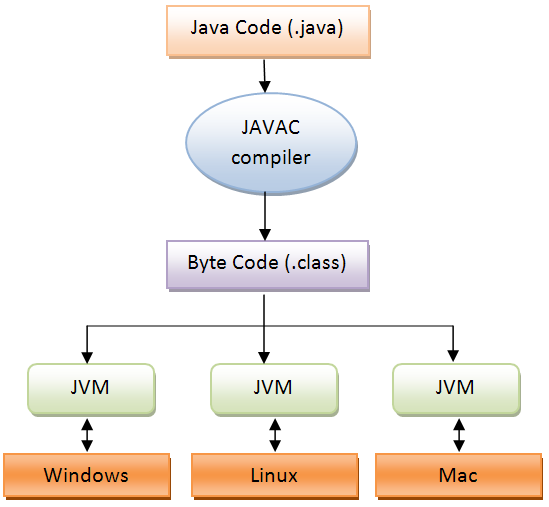
A: Java uses the javac compiler to compile java code to byte code. Byte code is what makes java platform independent. It can be run by any java virtual machine(JVM). The JVM is Platform dependent.
Q3: Can you change the contents of a final array “names”?
final String names[]= new String[10];
names[0]= "Kevin";
A:Yes, you can actually change the contents of “names” because in this use case of final, it will only lock the memory address of “names”, preventing any attempts of changing its memory location.
final String names= new String[3];
String otherNames= new String[3];

//Error, address of names can't be changed!
names= otherNames;
This is the first post on my new blog. I’m just getting this new blog going, so stay tuned for more. Subscribe below to get notified when I post new updates.



 Chris's Blog